If you want to know how to make glitch effects that actually work in a track, the short answer is: decide where they land before you decide what they sound like. A stutter on the one is a fill. The same stutter half a sixteenth late is a mistake. Below is how I build stutters, tape stops, reverses and buffer errors in Ableton Live with nothing but stock tools, how I keep them on the grid, and where a dedicated plugin saves me the busywork.
The five glitches worth knowing
Almost every glitch you hear in electronic music is one of these, or two of them stacked:
- Stutter / repeat – a short slice of audio played again and again, often shrinking (1/8, 1/16, 1/32) as it builds into a drop.
- Tape stop – playback slows to a halt, and pitch falls with it, like a turntable losing power.
- Reverse – a slice played backwards, usually the beat before a downbeat.
- Buffer and data errors – the sound jumps around inside itself, skips like a scratched CD, drops out, or falls apart like a broken codec.
- Bit-crush – fewer bits and a lower sample rate, so the sound gets grainy, aliased and hard.
The first four are about time. Only bit-crush is about tone. That matters, because time effects are the ones that can drift off the grid and wreck the groove.
How to make glitch effects by hand in Ableton Live
Beat Repeat: the stock stutter
Beat Repeat is Live's built-in stutter device, and it is better than its reputation. The controls that matter:
- Interval and Offset decide when it grabs audio. Interval is tempo-synced from 1/32 to 4 bars; Offset pushes the grab point later in sixteenths.
- Grid is the size of each repeated slice. No Triplets keeps it binary.
- Gate sets how long the repeats last in total, in sixteenths.
- Chance is the probability that a repeat happens at all. Set it to 100% while you design, then pull it down.
- Variation randomises the grid size. Great for happy accidents, bad for repeatable arrangements.
- Pitch and Pitch Decay push each slice lower than the last.
- The mix modes: Mix layers the repeats over the original, Insert mutes the original while repeating, Gate passes only the repeats.
My usual setup for a build: Insert mode, Chance 100%, Interval 1 Bar, Offset 12 (so it grabs the last beat), Gate 4, Grid 1/16. Then I automate Grid down to 1/32 over the last bar. The Repeat button is also worth mapping to a pad – it ignores the timing controls and repeats until you let go.
The limits, and the reason people go looking for a Beat Repeat alternative: it only stutters. No tape stops, no reverse, and with Chance or Variation below full you can't make bar 17 sound the same twice.
Tape stop in Ableton without a plugin
Live has no dedicated tape-stop device, but the warp engine can fake one well. For a tape stop effect in Ableton:
- Consolidate the bar you want to stop into one audio clip.
- Set the clip's warp mode to Re-Pitch, so slowing down also lowers pitch, like real tape.
- Add warp markers across the last beat, then drag them so each segment is stretched more than the one before. The playback slows step by step and the pitch drops with it.
- A short volume fade at the very end hides the click.
It takes a few minutes per stop, but it lands exactly where your warp markers sit, which is the whole point.
Reverse, chop and rearrange
For reverse glitches, duplicate a slice, open the clip and hit Reverse in Clip View. For buffer-style edits, consolidate the loop, split it on the grid and drag the pieces around: repeat beat two four times, swap three and four, drop a sixteenth of silence. Slice to New MIDI Track turns the loop into a Drum Rack, so you can play the slices from a keyboard and record the result as MIDI – the closest Live gets to an instrument made of your own audio. Ableton's chapter on audio clips, tempo and warping covers warp modes, reversing and slicing in detail.
Errors and bit-crush
Redux reduces bit depth and sample rate. Erosion adds digital degradation by modulating a very short delay with a sine or noise. Neither knows anything about time, so the trick is automation: draw them in for an eighth note, out again, on the grid. Put them on a return track and automate the send if you want the dry signal untouched. All of these devices are described in the Live audio effect reference.
Keeping every stutter effect in time
A glitch that drifts sounds like a bug, not a choice. Three habits keep mine in time:
- Edit on a fixed grid. In the Arrangement, a fixed grid (rather than one that changes as you zoom) means every split and every automation breakpoint snaps to the same division. I work at 1/16 for edits and switch to 1/32 only for rolls. Turn on triplets when the track swings.
- Divide, don't approximate. Stutter slices should divide the bar evenly: 1/4, 1/8, 1/16, 1/32, or their triplets. A slice of 1/12 or 1/24 sounds intentional; a slice of "about 90 ms" never does.
- Glitch the swing too. If the drums sit in a groove from the Groove Pool, a straight stutter will feel stiff against them. Either commit the groove before you chop, or route the glitch to a part that is already straight, like the pad or the bus.
The other rule: glitch the transitions, not the whole song. A glitch every four or eight bars is a hook. A glitch every bar is a texture you will tire of before the listener does.
The Eurorack idea: bending a buffer
Modular players have a different approach. Instead of chopping a clip, they feed audio into a buffer module and bend it live. The best-known example is the Data Bender by Qu-Bit Electronix, a stereo Eurorack module described as a circuit-bent digital audio buffer, inspired by the ways audio equipment fails. Its main controls are Bend (tape-like pitch wobble), Break (skipping, like a scratched CD) and Corrupt (simulated processing errors), plus Freeze, which locks the buffer. Freeze can be clocked from an external source, which is how it stays in time with the rest of the rack.
The appeal is obvious: you play the glitches as a performance instead of drawing them as edits. It is also the reason people search for a data bender plugin – the idea of a buffer you break in real time, synced to a clock, translates naturally into software. If you want the background, the Wikipedia article on circuit bending is a good start.
A glitch effect plugin for Mac and Windows that stays on the grid
After enough evenings of warp-marker tape stops, I built the tool I wanted. SPALL is a glitch buffer for macOS (AU and VST3) and Windows (VST3). The track runs into a 40-second buffer and SPALL plays back the last slice of it – repeated, reversed, bent or broken – with slices from four bars down to 1/32, counted from the song position. Every decision falls on a slice boundary, so it never drifts.
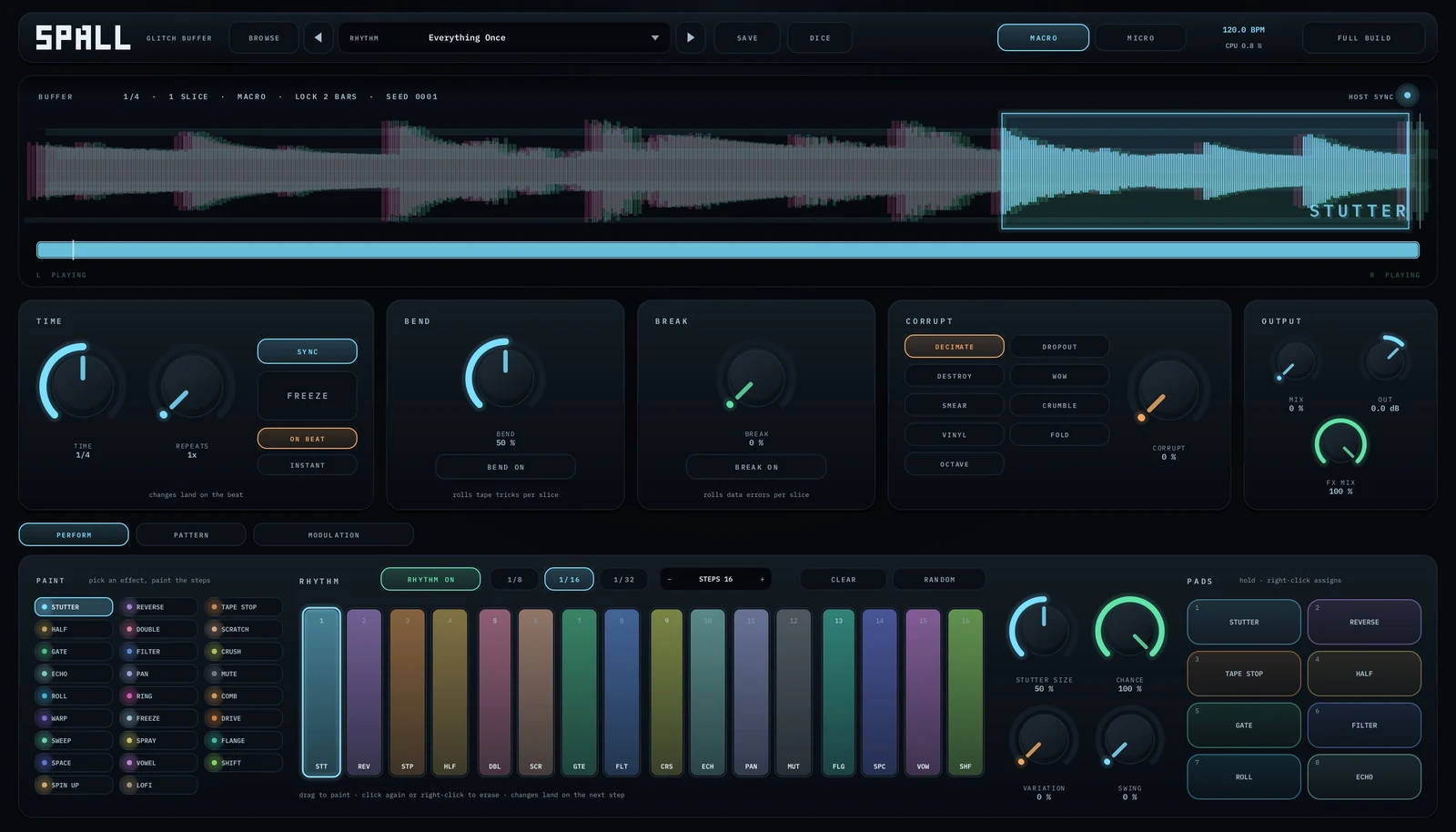
What changes compared with the stock route:
- All the glitch types in one place. Twenty-six rhythmic effects, including STUTTER, TAPE STOP, SCRATCH, GATE, ROLL and ECHO, painted onto a sixteen-step grid. CHANCE, VARIATION and SWING keep a painted bar from repeating itself.
- Pads to hold. Eight pads, each with any of the effects; the effect takes over from the next step. They are host parameters, so you can automate them or map them to a controller.
- Errors with one knob. Nine corrupt modes – DECIMATE, DROPOUT, DESTROY, WOW, SMEAR, CRUMBLE, VINYL, FOLD, OCTAVE.
- Random, but repeatable. The randomness hangs on a SEED and the song position. With LOCK on, 1, 2, 4 or 8 bars come back exactly the same every time – which is what Beat Repeat's Chance can't give you.
I still use Beat Repeat for a quick throwaway stutter. SPALL is for when glitches are part of the arrangement and I want them repeatable.
Bonus: granular, in time
Granular is the glitch's softer cousin: instead of breaking a slice, you scatter tiny grains of it. Free-running granular usually turns a loop into a wash. GRUS, our granular plugin, fires grains on a grid locked to the host tempo, from 1/4 down to 1/32 with triplets, and fires a burst where an attack sits, so the groove survives. Run SPALL into GRUS and the stutters turn into rhythmic grain clouds.
Glitches work best over parts that are already strong. If the harmony under them needs help, the guide on chords without music theory is where I would start.
Questions people ask
How do you make a stutter effect in Ableton Live?
Put Beat Repeat on the track, set Mix mode to Insert, Chance to 100%, choose an Interval and Offset for where it grabs, and set Grid to the slice size, such as 1/16. Automate Grid smaller for a build.
Does Ableton have a tape stop effect?
Live has no dedicated tape-stop device. You can build one by setting the clip to Re-Pitch warp mode and stretching the last beat progressively with warp markers, so speed and pitch fall together.
What is a good Beat Repeat alternative?
For edits, chopping consolidated audio on a fixed grid or using Slice to New MIDI Track. For a single plugin that also does tape stops, reverses and data errors on the grid, a dedicated glitch buffer such as SPALL covers more ground.
How do I keep glitch effects in time?
Edit on a fixed grid, use slice lengths that divide the bar evenly (1/8, 1/16, 1/32 or triplets), and match or commit any groove before you chop so the glitch does not fight the swing.
Is there a Data Bender plugin?
The Data Bender itself is a Qu-Bit Eurorack module. In a DAW, glitch buffer plugins work in similar territory – audio goes into a buffer that is repeated, bent or broken in time with the host.