I make music every day and I still could not tell you what a Neapolitan sixth is. If you want to write chords without music theory in Ableton, you are in good company. This guide is the stuff I actually use: the tools already inside Live 12, a handful of progressions that work in almost any track, and the reasons most programmed chords sound stiff, plus how to fix that by ear.
No circle of fifths, no roman numerals you have to memorise. Just keys, ears and a few habits.
Chords without music theory: what Ableton Live 12 already gives you
Live 12 quietly added a lot of harmony help. Before you download anything, switch these on.
Scale Mode: make wrong notes hard to hit
Open a MIDI clip and turn on Scale Mode in the clip properties (it is also in the Control Bar). Pick a Root Note and a Scale Name, for example C and Major. The notes of that scale light up on the piano ruler. Press G with the note editor focused to fold the editor to the scale, so only the notes that belong are left. Now every note you draw fits. That alone removes most of the "why does this sound wrong" moments.
The useful side effect: a lot of Live 12's MIDI devices and tools follow that clip scale. Pitch controls then count in scale steps instead of semitones, so "up two" always lands on a note that belongs.
The Chord MIDI effect: one key, a whole chord
Drop Chord from the MIDI Effects in front of an instrument. Each Shift knob adds a note on top of the one you play. Turn on Use Current Scale in the device title bar and set Shift 1 to +2 and Shift 2 to +4. Because it counts in scale steps now, every white key in C major gives you a chord that belongs to the key, major or minor, without you choosing which. Chord also has per-note Velocity, a Chance per note, and a Strum control that spreads the notes out in time. The MIDI effect reference in the Live manual lists every control.
Stacks and Strum: make chord progressions in Ableton in a few clicks
Live 12's MIDI Tools sit in the clip view. The Generators write new notes, the Transformations change the ones you have. For chords, three are worth knowing:
- Stacks (a Generator) adds chords or whole progressions within a scale. You pick shapes on a pad, set root and inversion, and add chords one after another.
- Strum (a Transformation) offsets the start times of the notes in a chord, from the bottom or from the top.
- Velocity Shaper reshapes the velocities of selected notes with an envelope you draw.
The full list is in the MIDI Tools chapter of the Live 12 manual. Stacks is the closest thing Live has to a stock chord generator, and it is a good place to start.
Chord progressions for beginners that always work
Here is the trick that made chords click for me. In C major, the scale is just the white keys. Stack every other white key, three of them, and you get a chord that belongs: C-E-G, D-F-A, E-G-B, F-A-C, G-B-D, A-C-E. That is all a "diatonic chord" is. Three of them sound bright (C, F, G), three sound darker (Dm, Em, Am).
A handful of four-chord loops built from those, all in C major / A minor, so you only need white keys:
| Chords | Mood | Why it works, in plain words |
|---|---|---|
| C, G, Am, F | Bright, open, pop | Starts at home, wanders, and F leads back to C when the loop restarts. |
| Am, F, C, G | Bittersweet, emotional | The same four chords, but starting on the dark one makes A minor feel like home. |
| C, Am, F, G | Warm, a bit nostalgic | Each chord shares notes with the next, so it moves smoothly. G pulls hard back to C. |
| Am, G, F, G | Driving, melancholic | Steps down one white key at a time, then climbs back. Great under techno or house pads. |
| Dm, G, C | Resolved, "arriving" | The strongest pull in the key. G wants to go to C, and Dm sets G up. |
Two things explain why these work without any terminology. First, neighbouring chords share notes, so the ear hears a connection instead of a jump. Second, G (built on the fifth white key from C) creates tension that C releases. Put G right before the chord you want to feel like home and it will.
Want a different key? Keep Scale Mode on, change the Root Note, and play the same shapes on the highlighted keys. Or write in C and use the clip's transpose. Nobody can hear which key you wrote it in.
Humanize chords: why MIDI block chords sound robotic
You draw C, G, Am, F in the piano roll, all notes at velocity 100, all starting on the grid, and it sounds like a ringtone. The chords are fine. The playing is not. Three things give it away:
- Velocity. A player never hits every key at the same strength. The top note, the one you hear as melody, usually comes out a little louder. Inner notes are softer. The bass has weight.
- Timing. Real hands do not land all fingers in the same millisecond. Chords roll slightly, usually from the bottom up, and the amount changes from chord to chord.
- Voicing. Root-position triads stacked in the same octave and jumping in parallel from chord to chord. No hand moves like that.
The stock fixes in Live 12:
- Open the Velocity lane, select the notes and use Randomize with a small Randomization Amount. Then push the top notes of each chord up by hand.
- Give notes a Velocity Deviation so they play slightly differently on every loop pass instead of being frozen.
- Use the Strum transformation with a small value, or the Strum knob on the Chord device, for a soft roll.
- Pull a few notes a hair off the grid with grid snapping off. A few milliseconds is enough; you want a feel, not sloppiness.
This works. It is also slow when you have sixteen bars of chords, and the randomness has no idea which note is the melody. That is the gap I kept falling into.
Voicing chords like two hands
This one change does more than any plugin. Think like a pianist with two hands:
- Left hand: the root note, low, maybe with its octave or the note five white keys above it. Keep it simple. Below about C1 in Live's note names (Live calls middle C "C3"), close-together notes turn into mud, so give the low end space.
- Right hand: the three chord notes, close together, around C3 to C4.
- Move the right hand as little as possible. When the chord changes, keep any note the two chords share, and move the others to the nearest note of the new chord. C-E-G to F-A-C becomes C-F-A, not a jump up to F-A-C. Rearranging a chord's notes like this is called an inversion, and it is the whole secret of smooth chords.
Do this with C, G, Am, F and the right hand barely moves: C-E-G, B-D-G, C-E-A, C-F-A. Suddenly the top line is a small melody of its own. Stacks has an inversion control and you can do it by hand in the piano roll. Both are worth practising, because once you hear it, you cannot unhear the block-chord version.
A free chord generator for Max for Live: TALUS
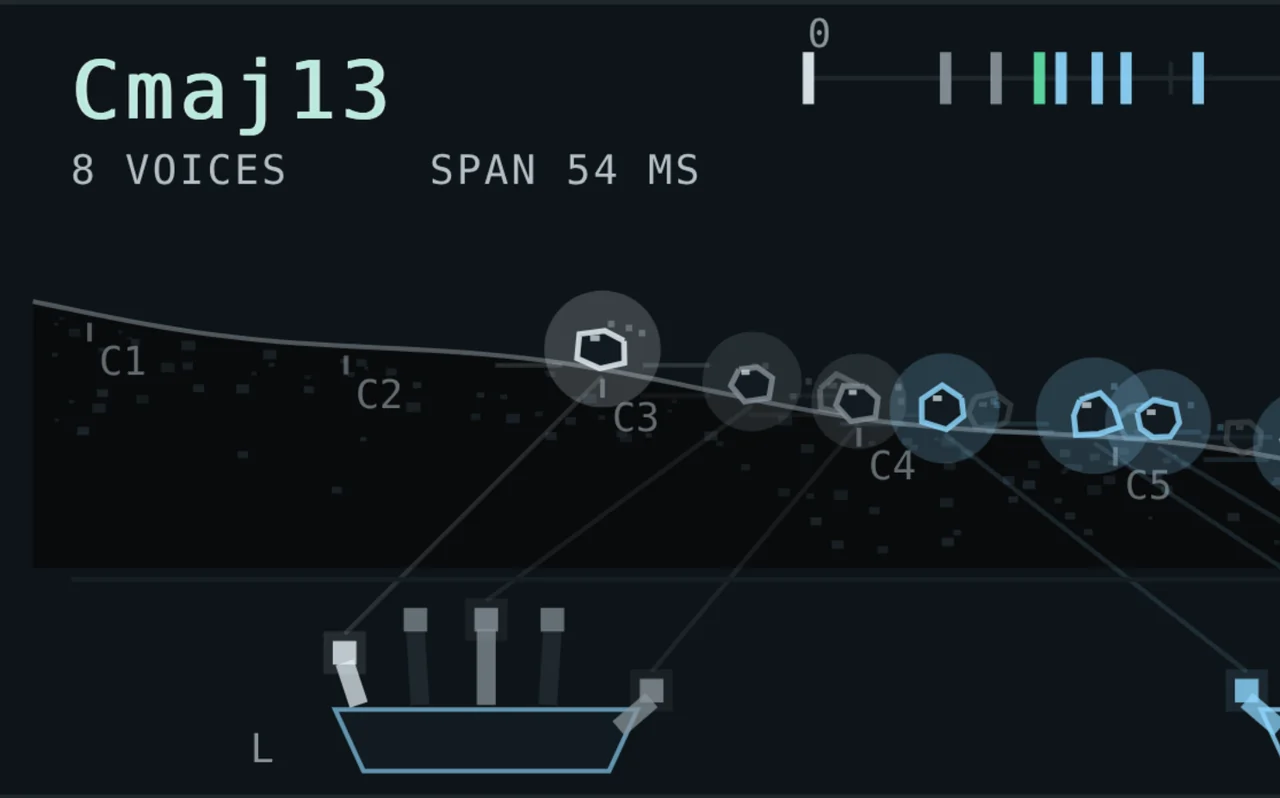
I built TALUS because I do not read theory either, and I was tired of doing everything above by hand for every track. It is a free Max for Live device for Ableton Live 10, 11 and 12, and it does two jobs.
In GENERATE you press one key and TALUS builds the chord of that key in your scale, three to ten voices, split into left and right hand. In HUMANIZE it keeps your own notes and only changes how they are played. Either way it follows the rules from the section above note by note: the top note comes a little earlier and louder, the bass carries weight, doubled notes sit underneath as ghost notes, and the chord rolls. With FLOW up, each new chord takes the inversion closest to the last one, so the top line moves like a hand.
The part I use most when I am stuck: after every chord TALUS shows five suggestions for where to go next, labelled HOME, LIFT, SAD, TENSE and TWIST. Click one to hear it on your own instrument, and it shows you the key that plays it. A starting point, not a verdict. When you like a take, CAPTURE plays the whole clip through and writes the played chords to a copy of the track right below, with your original untouched.
From chords to pads
Played chords really come alive on a sustained sound, because the small velocity and timing differences shape the attack of every voice. A few habits for turning chords into pads:
- Use longer notes than you think, and let them overlap a little into the next chord. Live's Span transformation can make notes legato in one go.
- Thin the left hand. A pad does not need a low root if a bass line already has it.
- Make the synth react to velocity, routing it to filter cutoff or brightness, so the louder top note actually sounds brighter, not just louder.
- Add space last. A long reverb glues the voices together; I wrote about rooms in real rooms with convolution reverb.
My own pad synth, DREAMS, was built around this: sixteen voices, each with its own place in the stereo field, and four velocity slots that send how hard you play to targets per voice. Feed it humanized chords and the pad moves differently on every chord.
That is really all of it. Turn on Scale Mode, pick one of the loops above, voice it like two hands, and let the playing breathe. Theory can come later, or never. It did not stop me.
Questions people ask
Can I make good chords in Ableton without knowing music theory?
Yes. Turn on Scale Mode in a MIDI clip so only notes in the key are highlighted, then stack every other note of the scale. Combined with a few proven progressions like C, G, Am, F, that covers most tracks.
Does Ableton Live 12 have a built-in chord generator?
Yes. The Stacks MIDI Generator adds chords or chord progressions within a scale, and the Chord MIDI effect turns each note you play into a chord. With Use Current Scale on, Chord follows the clip's scale.
How do I humanize MIDI chords in Ableton?
Vary velocities (top note louder, inner notes softer), roll the chord slightly with the Strum transformation, and voice chords so they move as little as possible. Randomize and Velocity Deviation in the Velocity lane help too.
Is there a free chord generator for Max for Live?
TALUS is a free Max for Live chord device for Ableton Live 10, 11 and 12. It builds two-handed chords from one key or humanizes your own, and suggests where to go next.
What is the easiest chord progression for beginners?
C, G, Am, F, played only on white keys. Starting the same chords on Am (Am, F, C, G) gives a darker, more emotional version.