If you want to know how to make an acid bassline, the good news is that the recipe is small: one oscillator, one resonant filter, an envelope that snaps it open, and a 16-step pattern with a few notes that slide and a few that are accented. The hard part is not the sound. It is the way all of those things push against each other while the pattern loops. I'll show you how I build one with nothing but Live's stock devices, then how I write the pattern and keep it moving, and at the end where my own synth makes it quicker.
What makes acid sound like acid
Almost every acid line traces back to one box: the Roland TB-303, released in 1981 as a bass companion for guitarists and made until 1984. It flopped as a product, ended up cheap on the second-hand market, and in 1987 Phuture's "Acid Tracks" turned its squelch into a genre.
The machine itself is modest. There is one oscillator with a switch between sawtooth and square, a resonant low-pass filter (often described as a diode ladder, which is a big part of its rubbery character), and a single decay envelope. The front panel is basically tuning, cutoff, resonance, envelope mod, decay and accent. That's it. The sound comes from how those few controls interact:
- Cutoff and resonance set the base tone. Acid usually lives with the cutoff fairly low and the resonance high, so the filter rings.
- Envelope mod decides how far each note kicks the filter open. Decay decides how fast it falls back. Short decay gives the "blip", long decay gives the "wow".
- Accent marks individual steps to hit harder: louder and with a stronger filter kick. With high resonance, accented steps start to bark.
- Slide ties a step to the next one and glides the pitch between them instead of retriggering. Slide and accent together are what make a 303 line sound like it talks.
Keep those four ideas in mind. Every step below is just rebuilding them.
A 303 bassline in Ableton with stock devices
You can get surprisingly close with Drift, which ships with every edition of Live 12. Analog works too if you have Suite, and I'll mention where it differs.
1. One oscillator, mono, with glide
Load Drift on a MIDI track. Set Oscillator 1 to Saw (or Pulse for the square-wave flavour) and turn Oscillator 2 down. Switch the Voice Mode to Mono, enable Legato, and give Glide a short time. In Drift, Legato means a new overlapping note changes pitch without resetting the envelopes, which is exactly the 303 slide behaviour. In Analog, the equivalent is the Gli switch with its Time slider and Legato enabled.
2. The filter and its envelope
Pick the 24 dB low-pass (Type II) in Drift's filter, pull the cutoff down to somewhere dull, and raise the resonance until it starts to sing. Now give the filter its envelope: route Env 2 to the low-pass frequency with a healthy positive amount, set Envelope 2 to zero attack, a short decay and zero sustain. This is your envelope mod and decay pair. Keep the amp envelope (Envelope 1) simple: fast attack, full sustain, short release.
3. Velocity as accent
Live has no accent button, but velocity does the job. In Drift's Mod section, route Velocity to LP Frequency (and if you like, a little to LP Resonance). Then high-velocity notes open the filter further, just like accented steps. In Analog, the filter envelope's Env < Vel slider gets you a similar result by scaling the envelope depth with velocity.
4. Some dirt after the synth
A clean resonant filter sounds polite. Put Auto Filter or a saturator after Drift. In Live 12's Auto Filter, the DFM and PRD circuits with some Drive add the grit that makes resonance feel aggressive. A second filter here also gives you a separate knob to ride later, which matters more than it sounds.
The Live instrument reference lists every Drift and Analog parameter if a name differs in your version.
Slide and accent: writing them in MIDI
This is where most stock-synth acid falls flat, so it gets its own section.
Slide is note length. With Mono and Legato on, a slide happens when one note is still held as the next starts. In the piano roll, stretch a note so its end overlaps the start of the next one by a hair. That pair will glide and the envelope won't retrigger. Notes that end before the next one starts are normal, punchy steps. Writing slides is just dragging note ends.
Accent is velocity. I keep most notes around 70 to 90 and put accents at 120 and up. With the velocity routing above, those steps jump out. Try accents off the downbeat: on the "and" of a beat they pull the groove forward.
A tip that saves a lot of fiddling: give slid notes and accented notes different jobs. A slide into an accented note sounds like a shout. A slide into a quiet note sounds like a sigh. Both are useful, but not on every step.
Writing the pattern: 16 steps, octaves and rests
The classic acid pattern is 16 sixteenth notes, one bar long, looping. Here is how I approach it:
- Start with the root. Put the root note on most steps. Acid lines are often almost one note, and the movement comes from the filter.
- Add octave jumps. Move three or four steps up an octave. Octave jumps with a slide are the most "303" interval there is.
- Add one or two colour notes. A minor third, a fifth or a flat seventh is plenty. More notes rarely make it more acid.
- Delete steps. Rests are the groove. I usually remove four to six steps so the line breathes around the kick.
- Place slides and accents last. Two or three slides and three or four accents per bar is a good starting point.
| Element | What to try | What it does |
|---|---|---|
| Rests | 4 to 6 of 16 steps | Leaves space for the kick, creates the swing |
| Octave jumps | 3 to 4 steps up 12 semitones | Gives the line its bounce |
| Slides | 2 to 3 overlapping notes | Makes it "talk" |
| Accents | 3 to 4 steps at velocity 120+ | Stabs of filter and volume |
If you get stuck, write a pattern you think is boring, then shift the whole clip one sixteenth later. Acid grooves often sit better against the kick when they start just off the grid line.
Moving the filter over time
A 303 line that never changes gets tiring after eight bars. The real performance in acid is the hand on the cutoff knob, slowly opening, then slamming shut, then riding the resonance into the break. You can do that in Live in three ways:
- Ride it live. Map cutoff, resonance and Envelope 2's decay to three knobs on your controller and record the moves into the arrangement. It sounds more human than any drawn curve.
- Clip envelopes. Draw a slow ramp on the filter frequency across a 16- or 32-bar clip, unlinked from the clip loop, so the movement runs longer than the one-bar pattern.
- Slow LFO. An LFO on cutoff with a long, bar-synced rate does the same unattended. Auto Filter's LFO is handy here because it moves the second filter without touching your synth.
The trick that makes it feel like a build: move decay and cutoff together. Longer decay plus higher cutoff makes the line grow. Then pull both back down at the drop and the line suddenly sounds tight and hard again.
The shortcut: an acid techno synth plugin with a step sequencer
Everything above works, and I think every producer should build an acid line by hand once. But I wanted the whole thing in one place, so I built it into PHONOLITH, my techno synth.
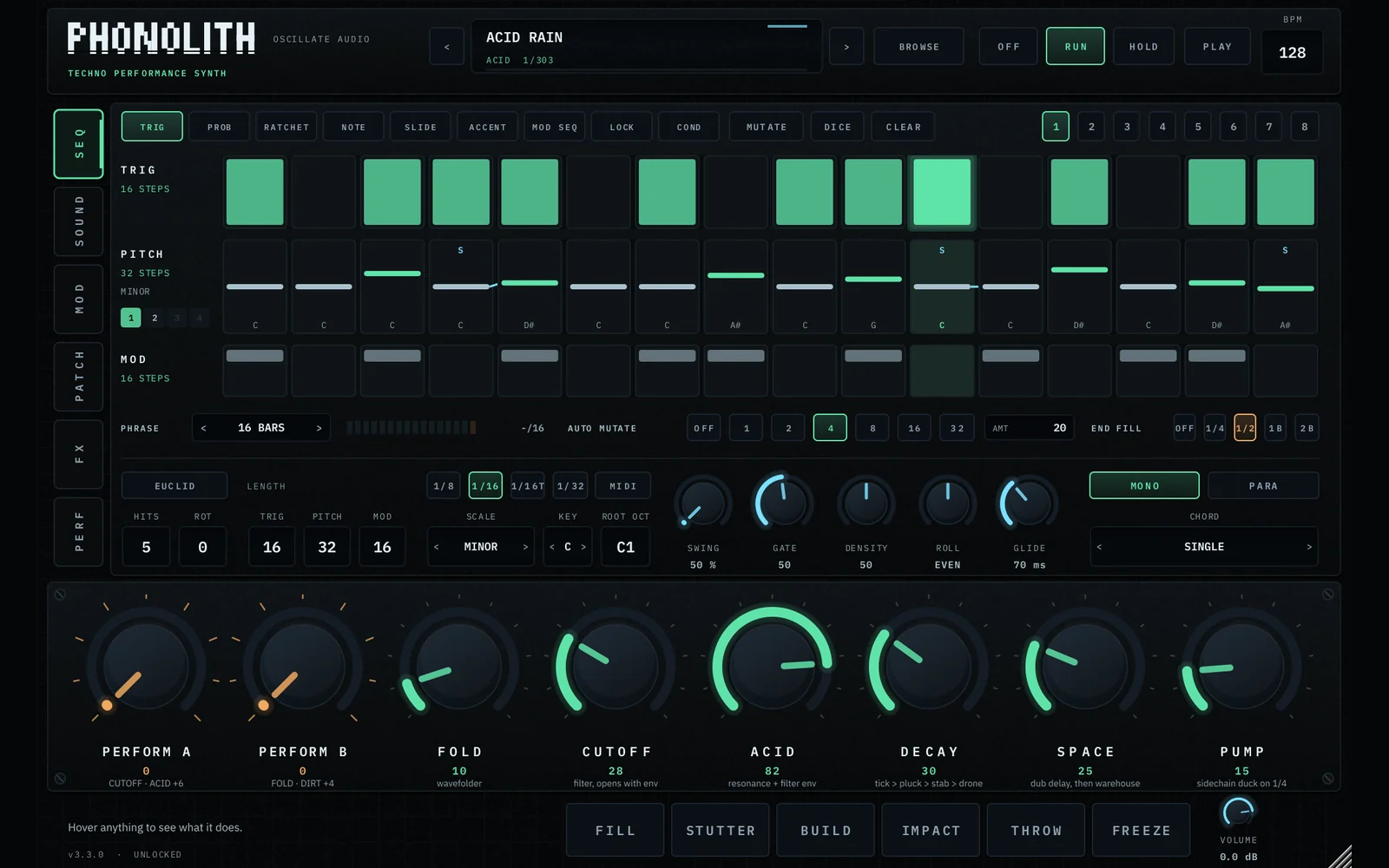
The parts of this guide map onto it directly. Oscillator A has an ACID mode, where TONE sweeps from saw to square and GRIT adds a rubbery bend. The filters include a DIODE ladder in the spirit of the 303 and SCREAM for the shriek, and the ACID knob takes the filters from clean to screaming. The built-in sequencer runs in MONO, where it slides and accents like a 303, with glide and swing, so you don't drag note ends in a piano roll. Trig conditions let a step play only every second time round, which keeps a short loop changing. And PHRASE ramps can open the filter over up to 64 bars, which is the slow cutoff move from the last section.
It also comes with a whole 303 bank: over fifty acid lines from Chicago 1987 to hard acid at 150, each with its pattern, with PERFORM A to build the acid and PERFORM B to tear it apart. It is inspired by the 303, not a clone of it.
If you DJ out of Ableton, there's one more angle. OSCILLATE DJ, my four-deck DJ tool for Live, loads PHONOLITH on its LIVE channel, and the sequencer follows the key of the track that is playing. So you can lay an acid line over a record during a set. I wrote more about that setup in how to DJ in Ableton Live.
A quick checklist
- One saw or square oscillator, mono, legato, short glide.
- Resonant low-pass, cutoff low, resonance high, a fast filter envelope with short decay.
- Velocity routed to the filter for accents.
- Overlapping notes for slides, 2 to 3 per bar.
- Root-heavy pattern, octave jumps, a few rests.
- Something that moves the cutoff over many bars, by hand if you can.
Then turn the resonance up one more notch than feels sensible. That's usually where it starts to sound like acid.
Questions people ask
What synth do I need to make an acid bassline?
Any mono synth with a saw or square oscillator, a resonant low-pass filter, a filter envelope and glide can do it. In Ableton Live, Drift and Analog both work, combined with velocity for accents and overlapping notes for slides.
How do I make a 303 slide in Ableton?
Set your synth to mono with legato and a short glide time, then lengthen a note in the piano roll so it overlaps the start of the next note. The pair glides in pitch without retriggering the envelope.
How do I do 303 accents in Ableton Live?
Route velocity to the filter cutoff (in Drift via the Mod section to LP Frequency), then give accented notes a high velocity like 120 and keep the rest lower. Accented steps then open the filter further and sound louder.
What filter settings make an acid sound?
Low cutoff, high resonance, a strong filter envelope amount and a short decay. Add some drive or distortion after the filter so the resonance bites.
Is PHONOLITH a TB-303 clone?
No. PHONOLITH is a techno synth with its own sequencer, an ACID oscillator mode, a DIODE filter in the spirit of the 303 and a bank of 303-style acid presets. It is inspired by the 303, not a clone of it.