You put a distortion on the bass, it suddenly sounds exciting in solo, and then the drop comes in and the floor is gone. The kick and bass feel smaller, not bigger. If you have ever wondered how to distort bass without losing low end, the short answer is: don't distort the part of the bass that holds the floor up. The long answer is this guide. I'll show you why distortion eats your low end, then three ways to fix it with Ableton Live's own devices (a parallel rack, a band-split rack and Roar's Multi Band mode), how to keep the sub mono, and how to check the result on small speakers.
How to distort bass without losing low end: first, why it disappears
A bass sound is mostly one big, slow wave: the fundamental. In most bass patches it is by far the loudest thing in the signal. A distortion reacts to level, so the fundamental is the first thing that hits the clipping point. The tops of that big wave get flattened, and the energy that used to be your sub is turned into harmonics higher up the spectrum.
Those harmonics are the bit that sounds great: they make the bass audible on a phone and give it bite. But three things happen to the floor at the same time:
- The fundamental gets squashed. Peaks are clipped, so the sub loses its punch and its movement. It feels flatter, because it literally is.
- The balance tips upwards. When you turn the distorted signal down to match the old loudness, the new mids and highs take up the level, and the low end ends up quieter than before.
- Everything mixes with everything. When a low note and a mid note go through the same distortion together, you don't just get harmonics of each, you also get sum and difference frequencies. That is called intermodulation, and on a bass it often sounds like mud and a wobbly, unstable bottom.
So the whole trick is separation. Keep the lowest octave clean and steady, and do the dirty work above it.
Parallel distortion on bass with an Audio Effect Rack
This is the method I reach for first, because it is fast and almost impossible to get badly wrong. You split the bass into two copies, leave one untouched, and distort only the upper part of the other.
In Live, an Audio Effect Rack does exactly that. Every chain in a rack gets the same input at the same time, processes it through its own devices, and the chains are mixed back together at the output.
- Drag an empty Audio Effect Rack onto your bass track and open the Chain List.
- Create two chains. Name the first one Clean and leave it empty.
- Name the second one Dirt. Put an EQ Eight first and set band 1 to the 48 dB/octave low cut, somewhere between 100 and 200 Hz to start.
- After the EQ, add Saturator or, in Live 12, Roar. Push the drive until it is clearly too much, then use the chain volume in the rack to bring it back in under the clean chain.
Because the low cut sits before the distortion, the sub never even reaches the clipper. No squashed fundamental, much less intermodulation down there. The clean chain carries the floor, the dirt chain carries the character.
A few things I have learned doing this:
- Leave the Dry/Wet of Saturator or Roar at 100% inside the dirt chain. The rack is already your dry/wet; mixing twice only confuses your ears.
- Saturator's Bass Shaper curve is built for low-end material and stays smoother when driven hard. With the low cut in front it is often more than you need, but it is a good one to try.
- Put a second EQ Eight after the distortion with a high cut. Distortion adds fizz up top, and on bass that fizz usually fights the hats more than it helps.
- Toggle the dirt chain on and off around the crossover area. Any low cut shifts phase near its cutoff, so where the two chains overlap you can get a small dip or bump. Move the cutoff a little until the low end sounds the same with and without the dirt.
If you only want a quick version without building a rack: Live 12's Saturator has a Color section with an Amt Lo control. Negative values reduce the saturation applied to the low frequencies, which is the same idea inside one device. And Roar has a Tone control with Color Compensation that lets you tilt the input away from the lows before the shapers and restore them after.
Multiband distortion and multiband saturation in Ableton
Parallel is great when you want one character on the whole upper bass. Multiband distortion goes a step further: you split the sound into separate frequency bands and treat each band differently. Clean sub, warm low mids, gritty mids, maybe a touch of fizz up top.
A common mistake first: Multiband Dynamics is not a band splitter. It has three bands with adjustable crossovers, but it is a compressor and expander. You cannot drop a Saturator inside one of its bands. For multiband saturation in Ableton you have two real options.
Option 1: a band-split Audio Effect Rack
Same rack as before, but now every chain gets a slice of the spectrum:
- Create three chains: Low, Mid and High.
- Low chain: EQ Eight with a 48 dB high cut at, say, 120 Hz. Leave it clean, or add only a little gentle saturation.
- Mid chain: EQ Eight with a 48 dB low cut at 120 Hz and a 48 dB high cut at around 1.5 kHz, then your main distortion.
- High chain: EQ Eight with a 48 dB low cut at 1.5 kHz, then something brighter or nothing at all.
- Map the cutoff frequencies to Macro Controls so you can move the crossover points without opening three EQs.
Be honest with your ears here: EQ Eight's filters were not designed as matched crossover filters. With everything bypassed, the three bands summed back together will not be perfectly flat around the crossover points. Usually you will hear it as a slight colour, sometimes as a thin spot. Listen to the rack with all distortion off against the bypassed rack and adjust before you start driving anything.
Option 2: Roar's Multi Band mode (Live 12)
If you have Live 12, Roar does the splitting for you. In its Routing Mode panel choose Multi Band. The signal is split into three bands, Low, Mid and High, each with its own shaper, and two crossover filters set where the bands meet. For bass: keep the Low band's shaper amount at or near zero, drive the Mid band, and set the low crossover just above the fundamental of your lowest notes.
That is the most convenient stock route to multiband distortion in Live today. The limits are three bands and one device's worth of shaper types, but for a lot of basslines that is plenty.
Keep everything below the crossover mono
Distortion with any stereo movement, a chorus behind it, or a wide preset can spread low frequencies across left and right. On a big system, and on anything that sums to mono, a wide sub can partly cancel itself. So after your distortion, make the lows mono again.
Live's Utility device (see the Live 12 audio effect reference) has a Bass Mono switch that turns the low frequencies of the signal into mono. The Bass Mono Frequency slider sets the cutoff anywhere from 50 to 500 Hz, and Bass Mono Audition lets you hear only the part that is being made mono, which makes it easy to tune. Put Utility at the end of the bass chain and set the frequency to roughly where your low crossover sits, so everything you kept clean also stays in the centre.
Check it on small speakers
The whole point of distorting a bass is that it reads on systems that cannot play the fundamental. So test for exactly that:
- Laptop speakers or a phone. Can you still follow the bassline? If it disappears, the dirt chain is too quiet or cut too high.
- Turn the clean chain off. What is left is what most earbuds will play. It should still sound like a bassline, not like noise.
- Then the opposite on your monitors or good headphones. Solo the clean chain and compare the sub level with the rack on and off. If the floor is the same, you have won.
- Match loudness before judging. Louder always sounds better for a moment. Bring the distorted version down to the same level as the bypassed one, then decide.
I also flip the master to mono for a few seconds. If the bass suddenly gets thinner, something below the crossover is still wide.
A multiband distortion plugin for Mac and Windows: the one-device version
Everything above works, and you can build it today with the devices you already have. I built it this way for years. What kept annoying me was the setup: three EQs to keep in sync, a crossover I could not see, and only one or two distortion flavours to put into the bands. So I made the version I wanted to use.
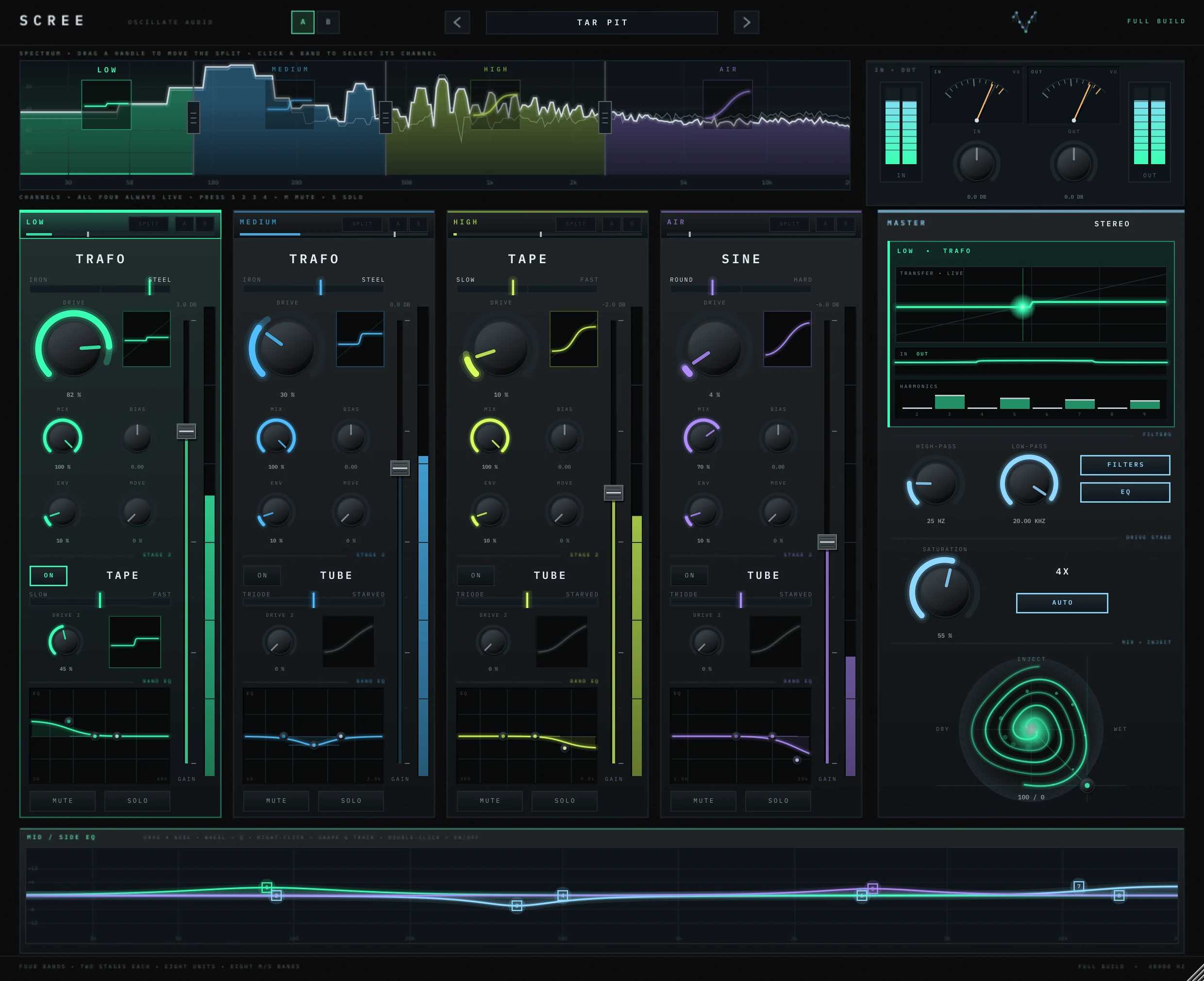
SCREE is a four-band distortion. You drag three crossover handles on the live spectrum; the crossovers are Linkwitz-Riley and phase-compensated, so the bands add back up flat. Each band gets its own character from eight units, and behind the distortion sits a mid/side EQ with eight bands, each one stereo, mid, side, left or right. For bass, that means: low band clean, the next band driven, and the side channel of the lows cut on the EQ, in one plugin instead of a rack.
If you don't want to buy anything, the rack and Roar methods above will get you a long way. The rule is the same with every tool: protect the lowest octave, distort above it, keep it mono, and check on the worst speakers you own. If you like breaking sounds on purpose, my guide to tempo-synced glitch effects is the next rabbit hole.
Questions people ask
Why does my bass lose low end when I add distortion?
Distortion reacts to level, and the low fundamental is usually the loudest part of a bass, so it gets clipped first. Its energy turns into higher harmonics, and once you match the loudness again the sub ends up quieter and flatter.
What is parallel distortion on bass?
You split the bass into a clean copy and a distorted copy and blend them. With a low cut before the distortion on the dirty copy, the sub stays clean while the upper bass gets the grit.
Can Ableton's Multiband Dynamics do multiband distortion?
No. Multiband Dynamics is a multiband compressor and expander, you cannot put other devices inside its bands. Use an Audio Effect Rack with EQ Eight on each chain, or Roar's Multi Band routing mode in Live 12.
At what frequency should I make the bass mono?
A common starting point is somewhere between about 100 and 200 Hz, ideally at or just above your distortion crossover. Live's Utility device lets you set Bass Mono anywhere from 50 to 500 Hz and audition what is being made mono.
Is there a multiband distortion plugin for Mac?
Yes, several. SCREE from Oscillate Audio is a four-band distortion for macOS 11 or newer (AU and VST3, Apple silicon and Intel) and Windows 10 or 11 (VST3), at $39.
Is there a multiband distortion plugin for Windows?
Yes. SCREE from Oscillate Audio runs on Windows 10 or 11 (64-bit) as a VST3 plugin, with a Windows installer, and on macOS as AU and VST3. One serial covers your PC and your Mac, $39.