This granular effect tutorial starts with a confession: for years, every time I put a granular device on a track, I got the same result. A lovely, shimmering wash for eight bars, and then I muted it because it no longer sat in the song. It was off the beat and a little out of tune against the chords. Granular is easy to make beautiful and hard to make musical. Below is how I keep it in time and in key in Ableton Live with stock tools, a few recipes I actually use, and where my own plugin speeds it up.
Granular synthesis explained in plain words
A granular processor chops sound into tiny pieces called grains, usually somewhere between a few milliseconds and a few hundred, and plays them back again, often many at once and often changed. Each grain gets a short fade in and out (the window or shape) so it does not click. That is the whole trick. Everything else is about which grains get played, when and how. If you want the history, Wikipedia's article on granular synthesis is a good start.
Five controls show up on almost every granular device, under different names:
- Size: how long each grain is. Short grains sound buzzy and synthetic, long grains keep the character of the source.
- Density: how many grains play per second, or how many overlap. Low density gives you separate blips, high density gives you a cloud.
- Position: where in the source the grains are read from. Freeze the position and you hold one moment. Move it and you scrub through the sound.
- Spray (also jitter or variation): random offset in time or position for each grain. A little makes things alive, a lot turns them into fog.
- Pitch: how far each grain is transposed. It often comes with a random pitch amount that scatters the grains across a range.
Why granular usually drifts out of time and key
Look at that list again. Two of the five controls are random by design, and the rest usually do not care about your song.
Time: most granular engines fire grains from their own clock, measured in milliseconds or Hertz, not in beats. Your track runs at 124 BPM and the grains run at "about 9 per second". Add spray and even that loose clock smears. The result has no downbeat, so the groove underneath starts to feel lazy. It also does not survive a tempo change.
Key: random pitch picks values inside a range, say plus or minus seven semitones. Most of those semitones are not in your scale. A few grains a second landing on a minor second against your pad is exactly the "slightly off" feeling that made me mute those tracks. Fixed pitch shifts can do it too: +5 sounds great on one chord and sour on the next.
So the fix is simple to say. Tie grain timing to the grid, and pick pitches that belong to the chord instead of a range.
Granular effect tutorial in Live: Grain Delay and Granulator III
Grain Delay
Grain Delay is Live's stock granular audio effect. It is a delay whose output is cut into grains, which you can then pitch and scatter. The controls that matter:
- Sync / Time: switches the delay between a beat division and milliseconds. Use Sync.
- Frequency: grains per second, in Hz. This is the size and density control in one, and it is not tempo-synced.
- Spray: random timing jitter for the grains.
- Pitch and Random Pitch: a fixed transposition in semitones, plus a random amount on top.
- Feedback and Dry/Wet, and an X-Y pad for playing two parameters at once.
The details are in Live's Audio Effect Reference.
Granulator III
Granulator III is a Max for Live instrument by Ableton, based on Robert Henke's Granulator. It comes with Live 12 Suite, and Ableton's pack page lists Live 12 Standard plus Max for Live as the requirement. It has three modes: Classic (the Granulator II engine), Loop (for rhythmic material) and Cloud (a cluster of grains for drones and textures, with a Density control). The main grain controls are Position, Scan, Grain Size and Variation, which replaces the old Spray. Its LFO has a tempo-synced Note mode.
Two things make it useful as an effect, even though it is an instrument. First, it can capture audio. Open the sample view, switch on I/O, choose a source (another track in your set, or an input), pick a Length of a few seconds and hit Capture. Capture is retrospective: it keeps the last few seconds of what was playing. Hit Save, or the recording is gone when you quit. Second, you play it with MIDI notes, so pitch comes from the keys you press, which means you can play it in key.
Keeping it musical: tempo synced granular by hand
Sync the grains to the tempo
With Grain Delay, turn Sync on and set the delay to a note value, 1/8 or 1/16. Then make Frequency match the tempo. A grain rate in Hz that equals a note value is just BPM divided by 60, times the number of grains per beat:
| Tempo | 1/4 (1 per beat) | 1/8 (2 per beat) | 1/16 (4 per beat) |
|---|---|---|---|
| 90 BPM | 1.5 Hz | 3 Hz | 6 Hz |
| 120 BPM | 2 Hz | 4 Hz | 8 Hz |
| 128 BPM | 2.13 Hz | 4.27 Hz | 8.53 Hz |
| 140 BPM | 2.33 Hz | 4.67 Hz | 9.33 Hz |
Keep Spray low, under a few milliseconds, if you want the pulse to survive. Larger grains (lower Frequency) also stay more stable with feedback and pitch. The catch: if you change the tempo, you have to redo the math.
In Granulator III, set the LFO to Note, choose a number of sixteenths, and send it to Position or the filter so the movement breathes with the bar. Loop mode is the one for rhythmic material.
Pitch grains to chord degrees
Set Random Pitch to zero. That one move does more for "in key" than anything else. Then choose fixed pitches from the chord you are on, counted in semitones:
- +12 / -12: octave. Safe on everything.
- +7: fifth. Safe on almost everything.
- +3 or +4: minor or major third. Only if it matches the chord.
- +5: fourth, the sus sound. Pretty, but check it against each chord.
For more than one pitch, put Grain Delay on two or three return tracks, each on a different interval (0, +7, +12 is my default), and blend them. In Granulator III, just hold the chord tones on the keyboard. If chords are not your strong side, my guide to chords without music theory covers the shapes.
Freeze a moment
A frozen grain cloud under a breakdown is one of my favourite sounds. The stock way: let Granulator III capture the moment you want, switch on Hold, set Scan low so the position barely moves, and play a long chord. With Grain Delay you can get close with high feedback and a short delay, but it never fully stops. When I really need it frozen, I resample a bar and loop a tiny piece in Simpler or Granulator.
Recipes: granular vocals into pads, drums into texture
Vocals into a pad
- Pick a held vowel from your vocal, ideally on the root or fifth of the key.
- Capture it into Granulator III (or drop the sample in) and choose Cloud mode.
- Grain Size long, a few hundred milliseconds. Density up. Variation moderate.
- Scan low, around 0.1, so it creeps through the vowel instead of playing the word.
- Play the chord progression with MIDI. Slow attack, long release on the volume envelope.
- Low-pass it and tuck it under the real chords. It glues the vocal to the harmony.
Drums into texture
- Send the drum bus to a return with Grain Delay, 100% wet.
- Sync on, 1/16. Frequency from the table above. Spray close to zero.
- Pitch +12 for a shimmer, or -12 for a dark rumble. Random Pitch at zero.
- Feedback around 40 to 60%, then high-pass the return so the low end stays with the real kick.
- Automate the return level into the drop and pull it out on the downbeat.
The weak spot of this recipe is the transients: grains land on the grid, but not on the actual hits, so the kick turns into a smear. For stuttered versions of the same idea, see my guide to glitch effects that stay on the grid.
A granular plugin in key and on the grid: GRUS
All of the above works. It is also a lot of arithmetic, return tracks and resampling, and that is why I built GRUS. It does the two jobs from this article by design: grains fire on a grid locked to the host tempo, from 1/4 down to 1/32 with triplets, and each grain takes a degree from a chord (fifths, minor, sus or octaves, across two octaves) instead of a random pitch inside a range. One knob crossfades between the chord and the scatter, so you can still go loose when you want to.
It also fixes the drum problem from the recipe above. GRUS watches the input for attacks and fires a burst of grains exactly where the attack sits, so the kick stays a kick. And there is a FREEZE, so the input can move on while the grains hold.
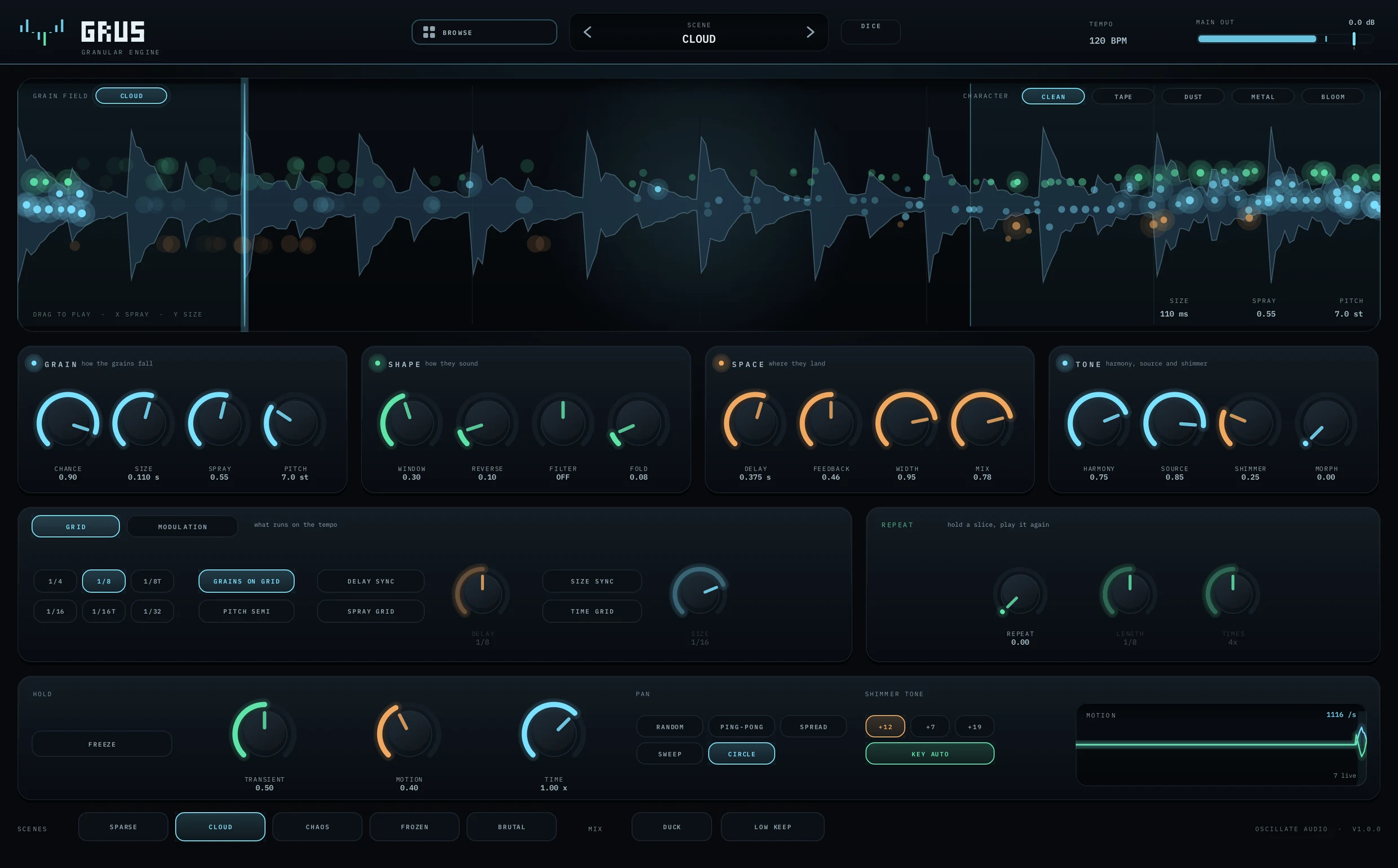
A tip for the vocal recipe: GRUS turns the vocal into grains in time, and DREAMS can then carry the actual chords as a pad underneath. Its sixteen voices each stand in their own place in the stereo field, so the two stay apart instead of fighting for the middle.
Whichever tools you use, the rule stays the same: decide the grid and the chord first, then make it pretty. Granular that respects both stops being a wash you mute after eight bars and becomes part of the song.
Questions people ask
What is granular synthesis in simple terms?
It cuts sound into tiny slices called grains, usually a few milliseconds to a few hundred, and plays them back with changed timing, position and pitch. Many overlapping grains turn any source into a texture or pad.
Does Ableton Live have a granular effect?
Yes. Grain Delay is a stock granular audio effect. Granulator III is a granular Max for Live instrument that comes with Live 12 Suite, and it can capture audio from other tracks.
How do I make Grain Delay sync to the tempo?
Turn Sync on for the delay time and set Frequency to BPM divided by 60, times the grains you want per beat. At 120 BPM that is 4 Hz for eighth notes and 8 Hz for sixteenths. Keep Spray low.
How do I keep a granular plugin in key?
Turn random pitch off and use fixed intervals that belong to the chord: octaves (12), fifths (7) and the right third (3 or 4). For several pitches, stack instances on returns, or play a granular instrument with MIDI notes.
How do you make granular vocals?
Take a held vowel, load it into a granular instrument with long grains and high density, scan slowly through it, and play the chords with MIDI. Low-pass it and tuck it under the harmony.