Some reverbs just sit between your speakers. Others, on headphones, seem to wrap around your skull: the tail opens up behind you, a room hangs above your head, a voice drifts past your left ear. That second kind is what people mean by binaural reverb, and once you hear it on a pad or a vocal it is hard to un-hear.
It is also easy to overdo. A mix that feels huge in headphones can turn thin, phasey or oddly placed on speakers. This guide is about both sides: what binaural actually means, why it works, where it falls apart, and how I use it without wrecking the speaker mix.
What "binaural" actually means
Binaural simply means "with two ears". A binaural recording is made the way you hear: two microphones placed in the ears of a real or dummy head, so each mic picks up the sound exactly as that ear would, shaped by the head and the ear itself. Play that back on headphones and your brain gets the same cues it gets in the real world. The result can sound startlingly real: things happen behind you, above you, right next to you.
A binaural reverb aims for the same effect in a mix. Instead of a wide stereo wash, the reflections of the room are given directions around your head, so the space seems to exist outside the headphones rather than between them.
HRTF explained in plain language
The trick behind all of this has a dry name: the head-related transfer function, or HRTF. It describes how a sound from one point in space is changed by your head, your outer ears and your torso before it reaches each eardrum. One HRTF per ear, per direction.
Your brain reads three kinds of cues from that:
- Time difference. A sound from your left hits the left ear a fraction of a millisecond before the right one.
- Level difference. Your head shadows the far ear, especially for high frequencies, so that side sounds quieter and duller.
- Ear-shape filtering. The folds of your outer ear (the pinna) bounce sound around and carve small notches into the spectrum. These notches change with direction and are the main way you tell up from down and front from back.
A binaural processor filters a sound with a measured HRTF for the direction you want, and on headphones your ears read it as coming from there. Two honest caveats. First, everyone's ears are different, and a generic HRTF is measured on somebody else's head. For some listeners it works beautifully, for others things in front collapse into the middle of the head or flip behind. The Wikipedia article on HRTF explains this front-back confusion well. Second, nothing here is magic: it is filtering and tiny delays, which is exactly why it reacts badly to some playback systems.
Binaural vs stereo: what changes for reverb
A normal stereo reverb gives you width. Its left and right outputs are decorrelated (different from each other), so the tail spreads across the stereo field. Live's own Reverb and Hybrid Reverb both have a Stereo control for exactly that: 0% is mono, above 100% widens the tail. Pan the send or the dry track and the room follows only loosely, because a classic stereo reverb mostly thinks in left, centre and right.
Binaural placement adds the dimensions stereo does not have: front and back, up and down, near and far. The difference in practice:
| Stereo reverb | Binaural placement | |
|---|---|---|
| Directions | Left to right, plus width | All around the head, including behind and above |
| Best on | Speakers and headphones | Headphones |
| Mono fold-down | Usually fine if the width is sensible | Can colour the sound, worth checking every time |
| Typical use | Almost every mix | Ambient, film and games, headphone-first releases, detail sounds |
When 3D reverb on headphones helps, and its limits
Where it earns its place:
- Headphone listeners. A big share of people hear music through earbuds. If your track lives there, a room that opens up around the head is a real feature, not a gimmick.
- Ambient and drone. Slow material has time for the listener to notice where things are. A tail that swells behind you is a different emotion from one that swells in front.
- Film, games and installations. Anywhere the listener is supposed to be inside a scene, direction is information.
- Small close details. Breaths, clicks, foley, whispered layers: the intimate, very close kind of sound that ASMR is built on. Placing a tiny detail just off one ear can do more than turning it up.
And where it does not:
- Speakers. Binaural cues assume each ear hears only its own channel. With speakers, both ears hear both speakers. This crosstalk smears the timing and filtering cues, so the "behind you" effect mostly disappears. What remains is usually a slightly odd, coloured stereo image. Special crosstalk-cancelling setups exist, but your listeners will not have them.
- Mono. Phones, club systems, some smart speakers. Summing two channels that differ by tiny delays and notches can cause comb filtering, so the reverb may sound hollow or drop in level.
- Everyone hears it differently. The generic-HRTF problem above. Do not build a track whose whole point depends on one sound being perceived exactly "behind and slightly up".
- Low end. Direction cues are weak in the bass anyway. Keep kick, sub and bass out of all this.
My rule: binaural is a layer on top of a mix that already works in stereo, not a replacement for it.
Checking mono and speaker compatibility
This is the boring part that saves the record. Everything here is stock Live:
- Put the 3D reverb on a return track. Then one fader decides how much of the effect the whole mix gets, and you can mute it to compare.
- Add a Utility on the Main track and toggle its Mono switch, which converts the stereo signal to mono (see Live's audio effect reference). Listen to the reverb return in particular: does it thin out, hollow out or jump in level? Leave Utility switched off when you are done, or delete it.
- If the low end smears, use Utility's Bass Mono on the return, which folds frequencies below an adjustable cutoff (50 to 500 Hz) to mono. Hybrid Reverb has a fixed Bass Mono switch on its output too.
- Listen on actual speakers, even cheap ones, and on a phone speaker. If the mix only works on headphones, pull the return down until it still works everywhere and simply sounds a bit bigger on headphones.
- A/B with a plain stereo reverb at matched level. If the binaural version does not clearly win on headphones, you do not need it on that track.
A good outcome sounds like this: on speakers, a pleasant room with nothing strange about it; on headphones, the same room, but now you are standing in it.
Placing and moving sources in 3D
Live has no built-in binaural panner. The stock tools are about the stereo field: the mixer's Pan control (with a Split Stereo Pan mode in its context menu, to place left and right channels separately), Utility's Width, and Auto Pan-Tremolo, which moves a signal across the stereo panorama with LFOs. For true 3D placement you need a device built for it.
A few approaches that work regardless of the tool:
- Behind is darker. Sounds from behind lose some top end, and that matches how we perceive them. Pairing a rear position with a gentle high cut makes it more convincing.
- Move slowly. Fast circling reads as an effect. A slow drift over eight or sixteen bars reads as space.
- Keep the dry sound anchored. Often the nicest result is a dry source roughly in front and its room placed around or behind it. The ear locks onto the dry signal and the room does the surrounding.
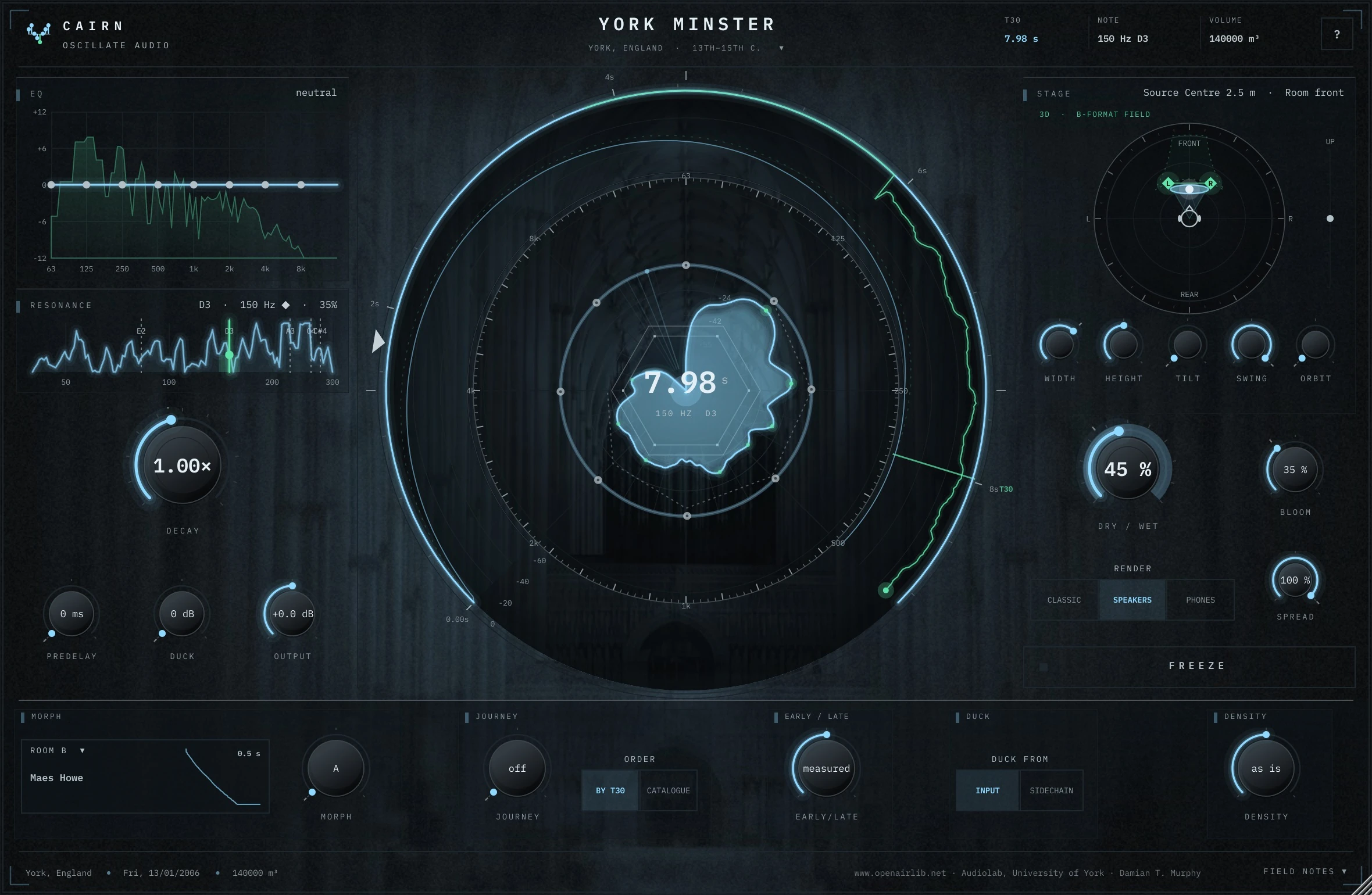
This is the part I built CAIRN's Stage for. CAIRN is a convolution reverb made from real places (more on that in the guide to real-room convolution reverb). On the Stage you put the space anywhere around your head: behind, above, circling. You can automate the path, so a room slowly orbiting over a breakdown is a matter of drawing an automation line. You can also drag your sources, and with WET FOLLOW switched on the whole reverb goes with them, tail included, right around your head on headphones. That is exactly the "dry in front, room behind" idea from above, plus movement, without building a chain by hand.
The same rules still apply to CAIRN: put it on a return, check mono, check speakers.
Panning voices in the stereo field
Not every track needs full 3D. Often the bigger win is simply a better stereo picture before anything hits the reverb. On a synth pad, all voices usually come out of the same spot; pan the track and they all move together.
The stock way to loosen that: duplicate the part on two tracks, split the notes between them and pan each, or use Auto Pan-Tremolo slowly at low depth so the pad breathes sideways. It works, but it is fiddly.
That fiddliness is why DREAMS, my pad synth, works the other way round. Each of its sixteen voices stands on a tilted stage: left to right is the stereo image, near to far is distance. A voice at the back is darker, quieter and sits in the room; one at the front is present and dry. Feed that into a 3D reverb and the voices already have positions the room can respond to. One honest note from its own page: most of that width collapses on phone or laptop speakers, so the mono check above applies here as well.
A simple binaural reverb workflow
- Get the mix working in stereo first, with a normal reverb if needed.
- Add the binaural or 3D reverb on a return and feed only the parts that benefit: pads, vocals, textures, small details. Not the low end.
- Place the room. Start subtle, slightly behind the source.
- Automate movement only where the arrangement asks for it: a breakdown, a transition, an outro.
- Check mono, speakers and phone. Pull the return down until all three are happy.
Done that way, headphone listeners get a space to step into, and everyone else just gets a good mix.
Questions people ask
What is binaural reverb?
Binaural reverb gives a room's reflections directions around the listener's head, using the cues our ears use in real life. On headphones the space seems to exist outside the head, including behind and above, rather than just between left and right.
Does binaural audio work on speakers?
Mostly not. With speakers both ears hear both channels, and this crosstalk blurs the cues that create the 3D effect. Use it as a layer on top of a mix that already works in stereo.
What is the difference between binaural and stereo?
Stereo places sound between two speakers, left to right. Binaural recreates what each ear would hear from a source in space, so on headphones it can also convey front, back, above and below.
What is an HRTF?
A head-related transfer function describes how your head, outer ears and torso change a sound from a given direction before it reaches each eardrum. Binaural processing filters audio with HRTFs so headphones can fake those directions.
Is binaural reverb mono compatible?
Not automatically. The tiny delays and filtering between channels can cause comb filtering when summed to mono, so check with Utility's Mono switch in Live and keep the effect on a return you can turn down.